The "Manage return" block is the entrance to returnEasier's Commercial Flow: the voluntary returns you offer as a store, with refund, exchange or store credit. It is an App Block you place in any section of your theme —such as a footer column— and it is deliberately separate from the legal withdrawal button. It only appears on Pro plans and above. Here are its settings and how to activate it.
What is it for?
The withdrawal button covers the consumer's legal right (full refund within 14 days) and lives on every plan. The Commercial Flow is something else: the returns policy you offer yourself —changing a size, returning something that did not convince, receiving store credit— with the rules you decide. That is why it has its own entrance, this block, which leads to the commercial portal at /{your-store}/manage.
Keeping the two entrances separate is not by chance: the law requires the withdrawal button to be clear and unambiguous, without mixing it with commercial returns. This block never removes access to the legal button.
How it is activated in the theme editor
It is added from the theme editor, without code:
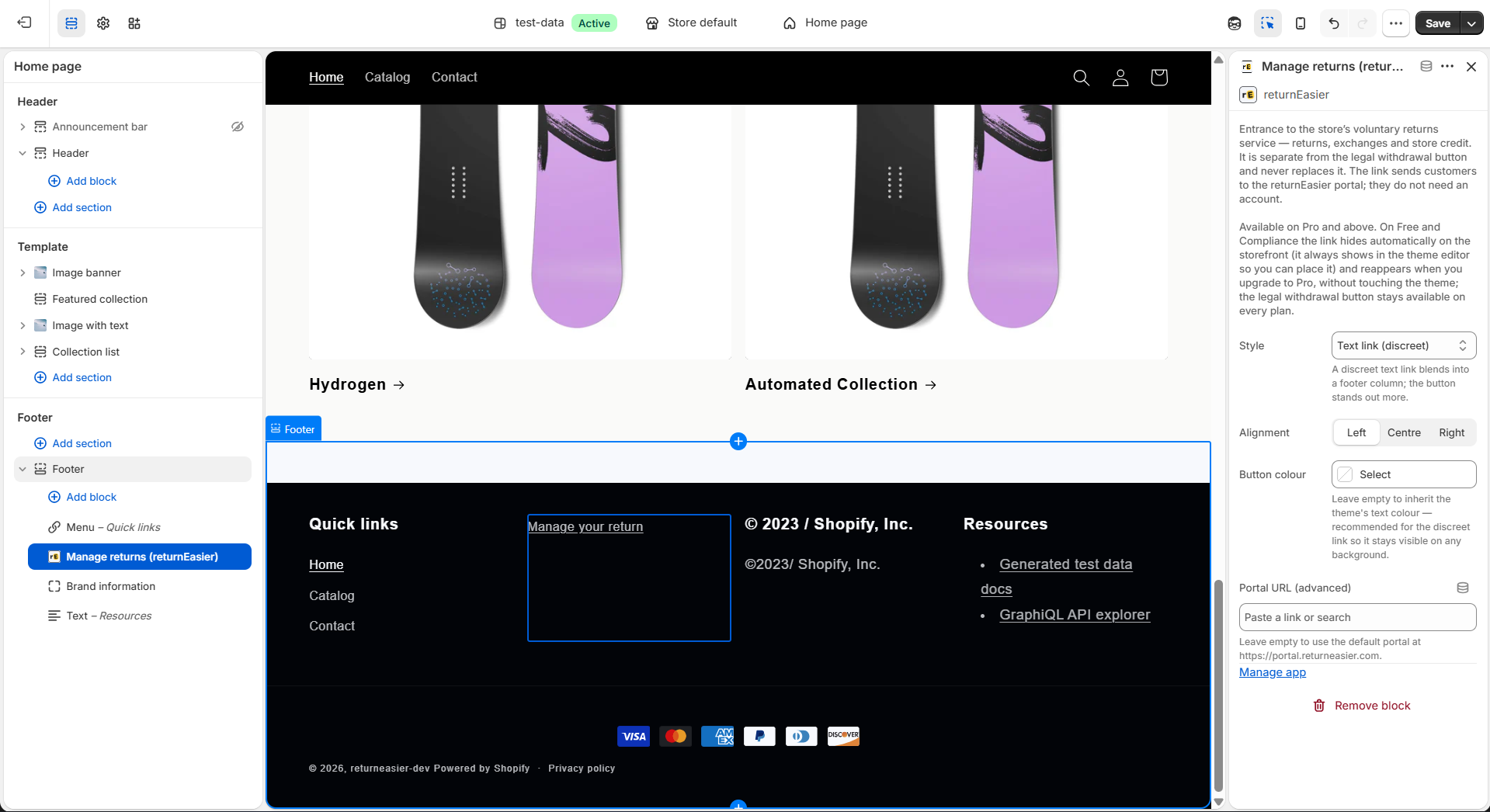
In Online Store → Themes → Customize, position yourself in the section where you want it (for example, a footer column), click Add block → Apps and choose "Manage returns (returnEasier)". Configure it and save.
The block's settings
The block has four settings:
- Style: Text link (discreet) or Filled button. The default is text link.
- Alignment: Left, Centre or Right. The default is left.
- Button colour: optional. If you leave it empty, the link inherits your theme's colour; if you choose the button style, it is used as the background colour (the text adjusts to white or to very dark grey automatically so it stays readable).
- Portal URL (advanced): optional. Leave it empty unless you serve the portal from your own domain; if you leave it blank, returnEasier uses the correct address by default.
The link label is "Manage your return" (it translates itself to your theme's language) and is not configurable: it is a commercial text, different from the fixed legal label of the withdrawal button.
Why it only appears on Pro and above
The Commercial Flow is a capability of the Pro and Scale plans. returnEasier controls the block's visibility automatically:
- On Pro or Scale, the link shows on your store.
- On Free or Compliance, it hides itself on the store —but stays visible in the theme editor, so you can leave it placed— and reappears as soon as you upgrade to Pro, without you having to touch the theme again.
If you have just changed plan and the link does not appear yet, open returnEasier (the dashboard or Plans): on loading, the app syncs your plan with the store and the link appears.
Separate from the legal button
Remember the distinction, because it is the basis of the whole product:
- Withdrawal button → legal right, every plan, fixed label "Withdraw from contract here", never hidden. You activate it with the App Embed or the withdrawal App Block.
- "Manage return" block → Commercial Flow, Pro+, label "Manage your return", visible only if your plan includes it.
For what the merchant does with each commercial request (approve, exchange, store credit, refund), see the article on the Commercial Flow actions.